- 2 × Classic burger7.800
- 1 × Fries1.500
Restaurant operating system
Run your restaurant from one place
POS, kitchen, tables, QR ordering, and stock — connected in one operating system built for floor speed.
✓No credit card
✓Quick setup
✓Arabic support
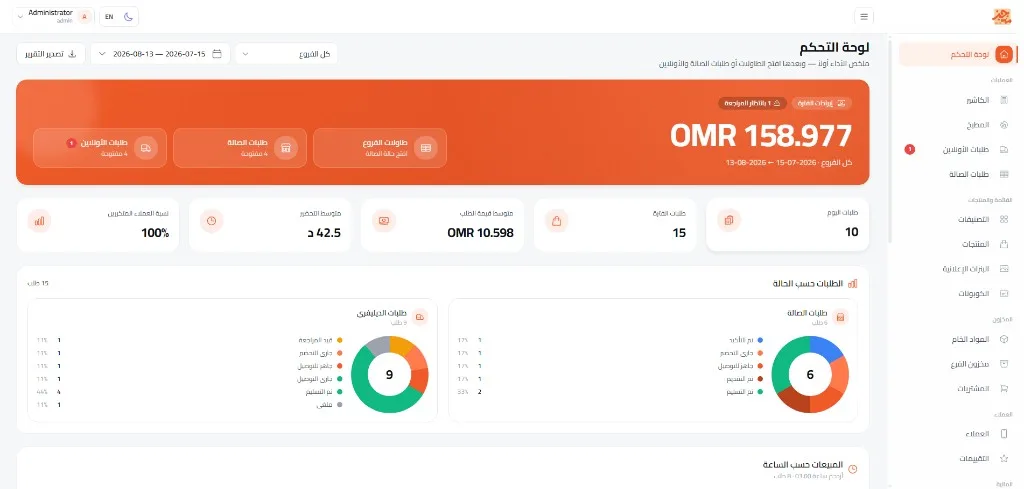
 Live operations
Every branch in one place
Live operations
Every branch in one place
Today revenue
1,248.500
+12.4%
New order
#1042
Burger × 2 · Pizza × 1
Ready to serve
Operational outcomes
More clarity in every shift
Connect orders, kitchen, tables, and stock to reduce manual handoffs and monitor operations in one place.
Connected order flow
Order status moves between POS, kitchen, and service without re-entry.
Daily visibility
Review orders, sales, and operating status from the admin dashboard.
Stock linked to sales
Use recipes and stock movements to follow ingredient consumption.
Restaurant operating system
Every restaurant operation in one place
One command surface that connects POS, kitchen, tables, orders, and stock — without scattered tools.
- Fast POS cashier
- Kitchen display
- Floor table map
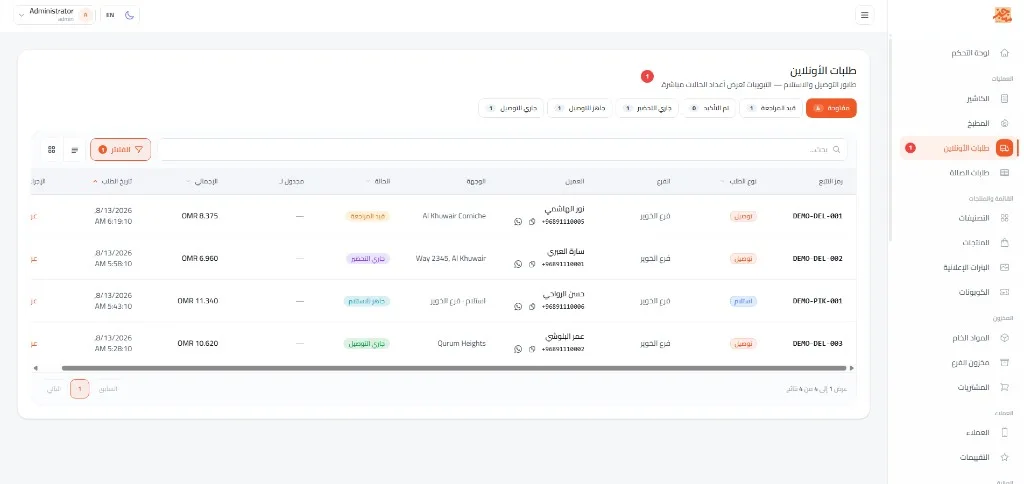
- Online orders board
Today revenue
48,250
Order flow
From first tap to kitchen-ready
Orders land, hit the kitchen, cook, and go ready — in one live floor rhythm.
- 01 New order POS or QR
- 02 Kitchen Live ticket
- 03 Prep Timer + alert
- 04 Ready Floor or delivery
- 2 × Burger
- 1 × Fries
Floor-ready tools
Run the floor without the clutter
Every screen has one clear job — POS, kitchen, and tables orbit the same center.
Floor anchor
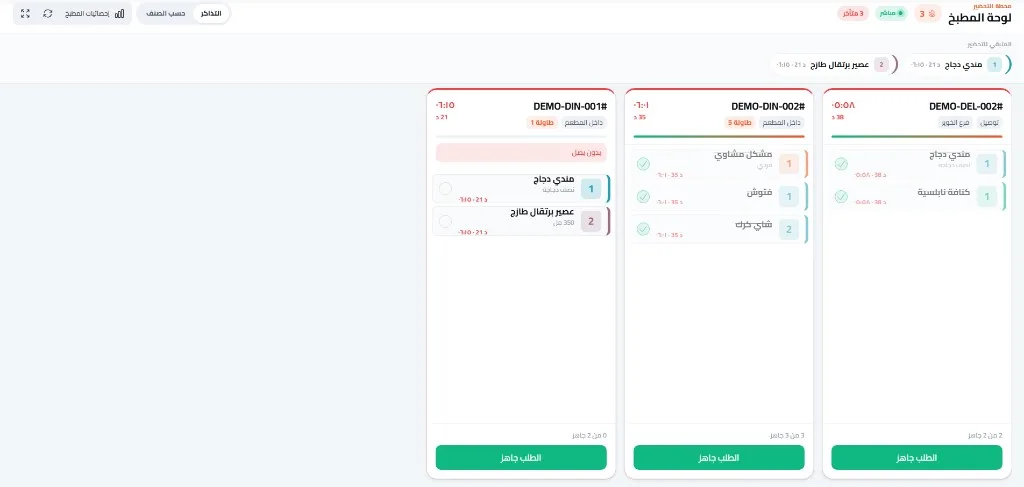
Kitchen display
Live tickets, timers, late alerts, and a clear “Order ready” action.
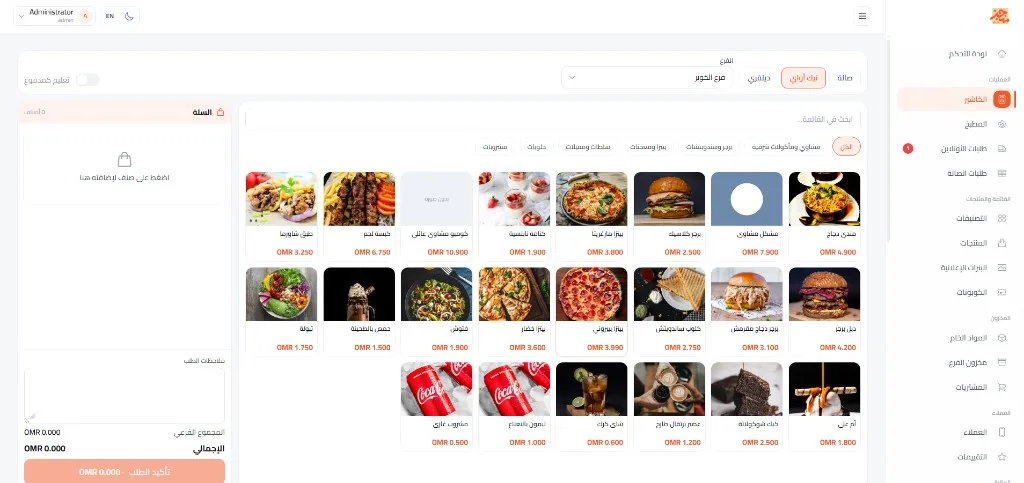
Fast POS cashier
Product grid, order types, and a cart ready to confirm in seconds.
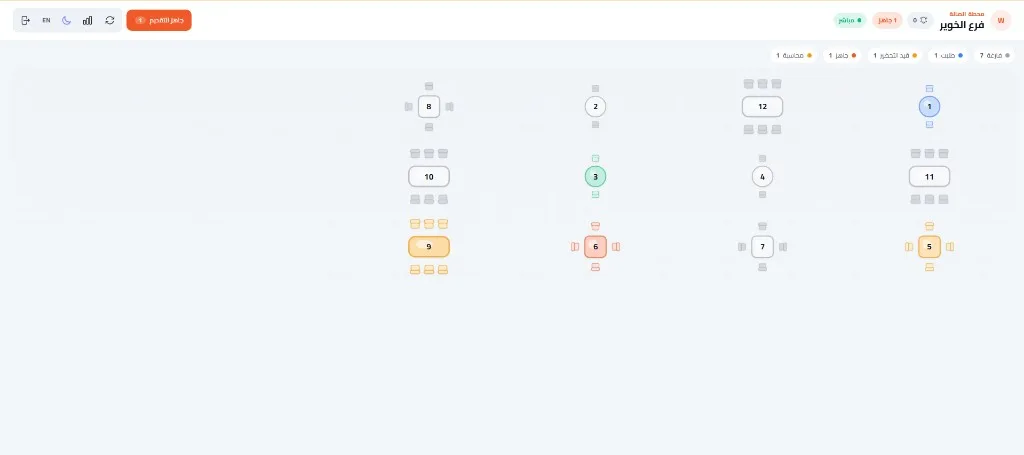
Floor table map
Color-coded table status: free, seated, ready, or billing.
Online orders board
Track delivery and pickup from intake to out-for-delivery.
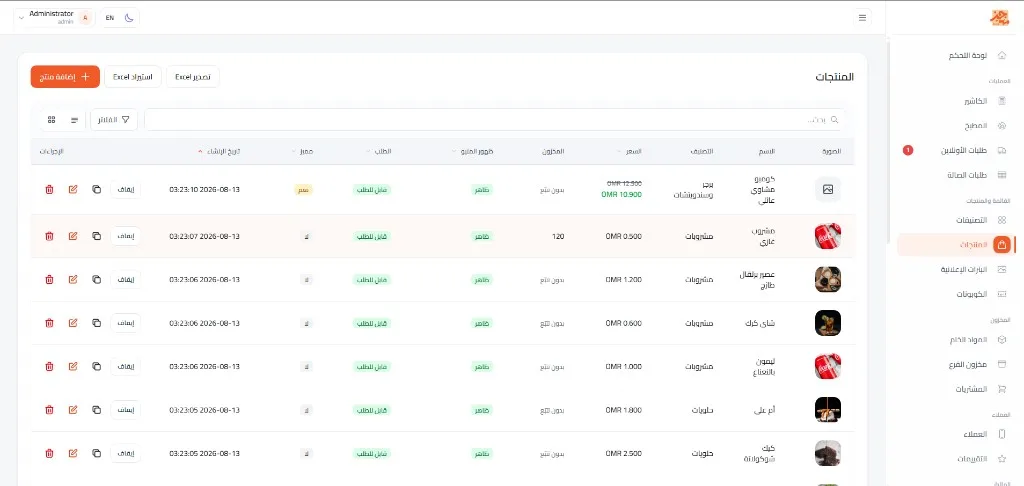
Raw materials & stock
Ingredients, branch stock, and purchases — without side spreadsheets.
QR table ordering
Guests order from their phone; waiter and kitchen get it instantly.
Everything connected
Your whole restaurant, connected
An order moves kitchen, table, invoice, stock — then shows up in analytics.
Restaurant OS
Command core — every module on one pulse
-
POS Live sell
-
Kitchen Live tickets
-
Tables Floor status
-
Orders One queue
-
Stock Auto deduct
-
QR Menu Self-order
-
Reports Daily pulse
Operating modules
Each module has one clear job
Browse restaurant modules and see what each part does — from POS to reports.
Dashboard
Tap a tab to explore the module
Connected screens
A focused interface for every role
Use the web interfaces on your team devices and share the QR menu with guests on their phones.
Point of sale
A fast cashier interface for entering and managing orders.
Kitchen display
Order tickets and preparation states in a kitchen-focused view.
Guest phone
A browser-based QR menu and ordering flow with no app download.
See it before you start
Explore the product or talk to us
Open the available demo, or contact us on WhatsApp to discuss your restaurant needs.
Guest experience
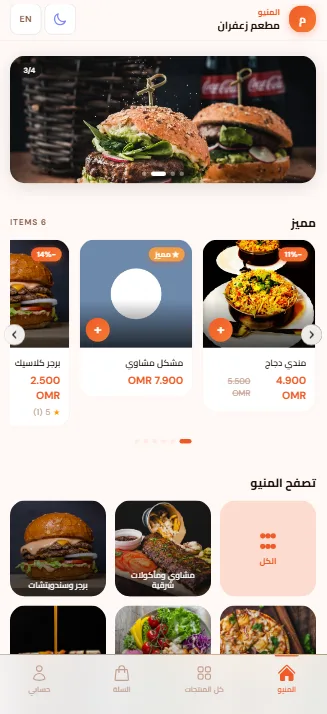
A polished mobile menu guests order from
Featured items, categories, cart, and account — in your restaurant brand.
- Scan QR
- Menu
- Cart
- Order
- Kitchen
Your restaurant menu
Order from your table
Scan & order
Your menu is ready
No app download needed
Straight to kitchen
QR
Live in three steps
No heavy setup. No long wait.
-
01
Register your restaurant
Create the account and your first branch in minutes.
-
02
Add the menu
Categories, prices, and photos — ready for POS and mobile.
-
03
Turn on the floor
Enable kitchen, tables, and stock — then take orders.
Onboarding and support
Clear steps to prepare your team
Set up the account and menu, then introduce each team member to the interface for their role.
Account setup
Configure restaurant details, branches, and core operating options.
Menu setup
Add categories, products, prices, and images.
Team guidance
Assign roles and permissions and use the POS, kitchen, and admin screens.
Clear pricing
Pick the plan that fits your restaurant and start operating.
Prices in OMR · Oman
Starter
9.900 OMR / month
Customer menu, products, hall and delivery orders, and one branch with table QR.
- Customer menu, products & categories
- Coupons, hall and delivery orders
- One branch with tables & QR
Growth
19.900 OMR / month
Full operations: cashier, waiter, kitchen, drivers, stock and finance.
- Everything in Starter
- Cashier, waiter & kitchen display
- Delivery drivers, ingredients, stock & expenses
- Multiple branches, reports & finance
Starter
118.800 OMR / year
Customer menu, products, hall and delivery orders, and one branch with table QR.
- Customer menu, products & categories
- Coupons, hall and delivery orders
- One branch with tables & QR
Growth
238.800 OMR / year
Full operations: cashier, waiter, kitchen, drivers, stock and finance.
- Everything in Starter
- Cashier, waiter & kitchen display
- Delivery drivers, ingredients, stock & expenses
- Multiple branches, reports & finance
Prices in OMR. Upgrade anytime.
Run your restaurant from one place.
POS, kitchen, tables, QR, and raw materials — ready from day one.
Quick answers
Do you have kitchen and waiter screens?
Yes — a live kitchen board, floor table map, and dine-in / waiter flow.
Is QR table ordering included?
Yes. Guests scan, order, and the ticket reaches kitchen and floor instantly.
Are raw materials tracked?
Yes. Ingredients, branch stock, and purchases live in the same platform.
How fast can we go live?
It depends on menu size and branch count. Start by creating the account, adding the menu, and enabling the screens your team needs.
Which order types are supported?
Dine-in, pickup, and delivery orders are supported, with operating flows for each type.
Can I manage more than one branch?
Yes. You can configure branches and manage branch-related operating data from the same platform.
Can staff permissions be controlled?
Yes. Roles and permissions control what each team member can view or manage.
Is the menu available in Arabic and English?
Yes. Content and interfaces support Arabic and English, including right-to-left display.